Many organizations are still managing Windows devices through traditional Group Policy Objects (GPOs), but as hybrid work and cloud-first strategies continue to evolve, Microsoft Intune has become the preferred platform for modern device management.
Migrating from GPO to Intune is not just a technical migration. It is a transformation of how devices, security policies, and user experiences are managed across the enterprise.
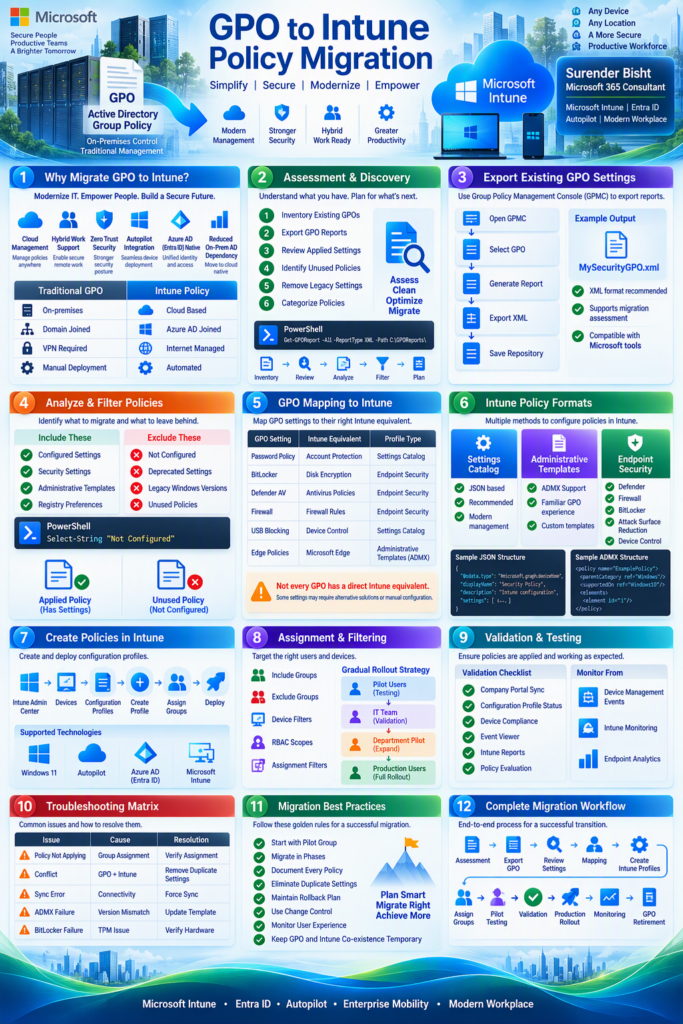
In this infographic, I’ve summarized:
✅ Why organizations are moving from GPO to Intune
✅ Assessment and discovery approach
✅ GPO export and analysis steps
✅ Mapping GPO settings to Intune policies
✅ Settings Catalog vs Administrative Templates vs Endpoint Security
✅ Assignment and filtering strategy
✅ Validation and troubleshooting techniques
✅ Migration best practices and phased rollout approach
One key lesson from recent migration projects:
The biggest challenge is rarely creating Intune policies. The real effort lies in policy analysis, mapping, testing, conflict management, and ensuring a smooth user experience.
For anyone planning a Windows 11, Autopilot, Entra ID, or Intune transformation, I hope this serves as a useful reference.
What has been the biggest challenge in your GPO to Intune migration journey?
#MicrosoftIntune #EndpointManagement #Microsoft365 #Windows11 #Autopilot #EntraID #ModernWorkplace #EndpointSecurity #DeviceManagement #CloudMigration #DigitalTransformation #EnterpriseIT #M365 #ITInfrastructure #WindowsManagement