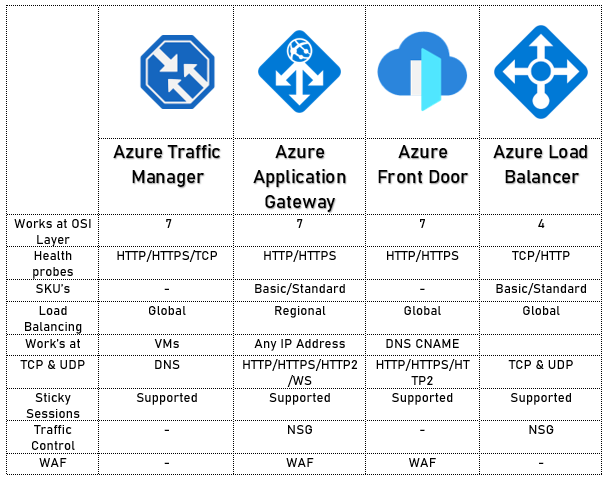
I am happy to announced that I have successfully completed proof of concept “Azure Traffic Manager” . Throughout this journey, I had an incredible opportunity to explore the great feature of Azure traffic manager and how to aligns organization’s global presence and equips them with a flexible, resilient, and traffic-aware web application infrastructure, addressing the unique needs of users in across region and globally.
1. What Is Azure Traffic Manager?
Azure Traffic Manager allows you to regulate the distribution of user traffic by using DNS to direct requests to the most appropriate service endpoint supported on a traffic-routing method and therefore the health of the endpoints.
Azure traffic manager selects an endpoint based on the configured routing method. It supports a variety of traffic-routing methods to suit different application needs. After the selection of endpoints, the client is connected directly to the appropriate service point. It also provides endpoint health checks and automatic failover. It also enables you to build a highly available application that is resilient to failure, including the failure of an entire Azure region.
- Why Do We Use Traffic Manager?
Traffic Manager uses DNS to direct client requests to the most appropriate service endpoint based on a traffic-routing method and the health of the endpoints. An endpoint is any Internet-facing service hosted inside or outside of Azure. It provides a range of traffic-routing methods and endpoint monitoring options to suit different application needs and automatic failover models. It is resilient to failure, including the failure of an entire Azure region.
These following traffic routing methods which are available:
1.) Priority
2.) Weighted
3.) Performance
4.) Geographic
5.) Multi-value
6.) Subnet
Here’s how I performed
Build Virtual Machine in US and Asia location
Installation of Visual Studio
Create Web Apps in Azure App service
Create Web application on Visual studio
Create Traffic manager
Building Endpoints and configure Priority setting
Testing the Configuration With Performance and With Priority
I appreciate K21Academy: Learn Cloud From Experts assistance and resources during enablement. This achievement is in line with our goal of updating and optimizing our Network load balancing management procedures for Azure resources.
Please feel free to like, comment, and share what you’ve learned along with my learning. Together, we will delve further into the fascinating potential of Azure and its surrounding ecosystem.

Decision Tree:
